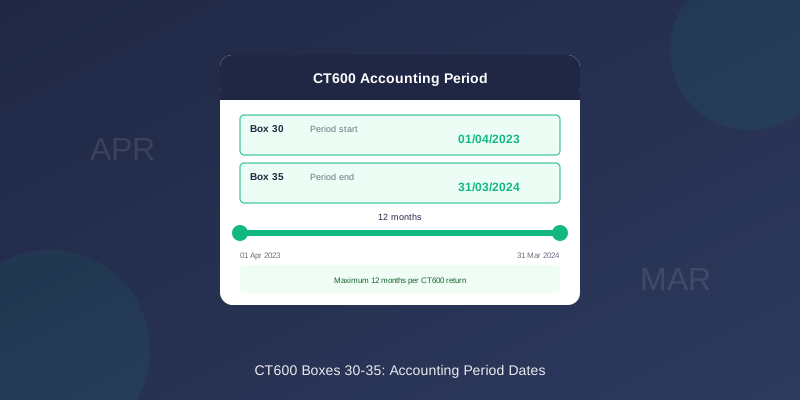
CT600 Boxes 30-35: Accounting Period Dates Explained
Boxes 30-35 on the CT600 capture your accounting period dates. Getting these right is crucial - incorrect dates cause submission rejections and can affect your tax calculation.
What Goes in Boxes 30-35?
| Box | Description | Format |
|---|---|---|
| 30 | Start of accounting period | DD/MM/YYYY |
| 35 | End of accounting period | DD/MM/YYYY |
| 31 | Start of return period | DD/MM/YYYY |
| 32 | End of return period | DD/MM/YYYY |
| 33 | Period covered by accounts start | DD/MM/YYYY |
| 34 | Period covered by accounts end | DD/MM/YYYY |
Understanding Period vs Return vs Accounts
Accounting Period (Boxes 30 & 35)
The period for which Corporation Tax is calculated:
- Maximum 12 months
- Determines tax rates and thresholds
- Must follow directly from previous period
Return Period (Boxes 31 & 32)
The period covered by this specific CT600:
- Usually same as accounting period
- Different if split period or amended return
Accounts Period (Boxes 33 & 34)
The period covered by your statutory accounts:
- Can be up to 18 months
- May differ from CT600 period for extended periods
Standard Scenario: 12-Month Period
For a typical 12-month accounting period:
Example: Year to 31 March 2024
| Box | Value |
|---|---|
| 30 | 01/04/2023 |
| 31 | 01/04/2023 |
| 33 | 01/04/2023 |
| 34 | 31/03/2024 |
| 35 | 31/03/2024 |
| 32 | 31/03/2024 |
Extended Period (Over 12 Months)
For accounting periods over 12 months, you need two CT600 returns.
Example: 18-month period 1 Oct 2022 to 31 March 2024
First CT600 (12 months):
| Box | Value |
|---|---|
| 30 | 01/10/2022 |
| 35 | 30/09/2023 |
| 33 | 01/10/2022 |
| 34 | 31/03/2024 |
| Box | Value |
|---|---|
| 30 | 01/10/2023 |
| 35 | 31/03/2024 |
| 33 | 01/10/2022 |
| 34 | 31/03/2024 |
Short Accounting Periods
Periods can be shorter than 12 months:
- First period after incorporation
- After changing accounting reference date
- Before striking off
Company incorporated 1 October 2023, first year end 31 March 2024.
| Box | Value |
|---|---|
| 30 | 01/10/2023 |
| 35 | 31/03/2024 |
How to Determine Your Dates
Step 1: Find Your Accounting Reference Date
Your accounting reference date (ARD) determines your period end:
- Check Companies House for your company
- Look for "Accounting reference date" or "Next accounts due"
- This is normally your period end date
Step 2: Determine Period Start
Your period starts:
- First period: Date of incorporation
- Subsequent periods: Day after previous period ended
Step 3: Check for Extended Periods
If start to end is over 12 months:
- Split into two CT600 returns
- First: 12 months maximum
- Second: Remainder
Common Date Mistakes
1. One Day Off
Wrong:
- Period start: 31/03/2023
- Period end: 31/03/2024
- Period start: 01/04/2023
- Period end: 31/03/2024
2. Overlapping Periods
Each day must be covered by exactly one period - no overlaps or gaps.
Wrong:
- Previous period: Ended 31/03/2023
- Current period: Started 31/03/2023 (overlap!)
- Previous period: Ended 31/03/2023
- Current period: Started 01/04/2023
3. Wrong Year
Double-check the year on all dates. A common error is typing 2023 when you mean 2024.
4. Extended Period as Single Return
Periods over 12 months must be split into two CT600s. You cannot file a single return for more than 12 months.
Tax Implications of Period Length
Period length affects:
Tax Rate Thresholds
Thresholds are pro-rated for short periods:
| Period Length | Small Profits Limit | Main Rate Limit |
|---|---|---|
| 12 months | £50,000 | £250,000 |
| 6 months | £25,000 | £125,000 |
| 9 months | £37,500 | £187,500 |
Payment Deadline
Corporation Tax is due 9 months and 1 day after period end.
12-month period to 31/03/2024:
- Tax due: 01/01/2025
- Tax due: 01/01/2025 (still 9 months + 1 day from period end)
When Using TinyTax
TinyTax asks for your period dates and handles the complexity:
- Enter your period start and end dates
- TinyTax validates the dates
- If over 12 months, automatically splits into two returns
- Boxes 30-35 are populated correctly
- Dates that don't follow your previous period
- Periods that need splitting
- Potential date format issues
Related Articles
- CT600 Boxes Explained
- Extended Accounting Periods
- Changing Your Accounting Period
- First CT600 Return Guide
Need Help?
TinyTax validates your accounting period dates and ensures they align correctly. For extended periods, the software automatically handles the split and populates all date boxes correctly.
Start Your CT600 Filing →