CT600 Box 235: Adjusted Trading Profit Explained
Box 235 shows your adjusted trading profit - the profit figure after making tax adjustments to your accounting profit. This is a crucial box that determines how much of your trading income is actually taxable.
What Is Box 235?
Box 235 is labelled: "Adjusted trading profit or losses before losses brought forward and qualifying donations"
It represents your trading profit after:
- Adding back disallowable expenses
- Deducting capital allowances
- Making other tax adjustments
How Box 235 Is Calculated
The basic formula:
``` Accounting profit (from P&L) + Disallowable expenses (add back)
- Capital allowances (deduct)
Common Adjustments
Items Added Back (Increase Profit)
| Expense Type | Why Disallowed |
|---|---|
| Depreciation | Replaced by capital allowances |
| Entertainment | Not allowable for tax |
| Personal expenses | Not wholly business |
| Fines and penalties | Public policy |
| Donations to individuals | Not qualifying |
| Legal costs for capital items | Capital nature |
Items Deducted (Reduce Profit)
| Deduction | Reason |
|---|---|
| Capital allowances | Tax version of depreciation |
| AIA (Annual Investment Allowance) | 100% relief on qualifying assets |
| R&D enhanced deduction | Extra relief for qualifying R&D |
| Patent box relief | Reduced rate on patent income |
Step-by-Step Calculation
Step 1: Start with Accounting Profit
Take your net profit from the Profit & Loss account:
| Item | Amount |
|---|---|
| Turnover | £100,000 |
| Less: Cost of sales | (£40,000) |
| Gross profit | £60,000 |
| Less: Expenses | (£35,000) |
| Net profit | £25,000 |
Step 2: Add Back Disallowable Items
Review expenses for non-allowable items:
| Add Back | Amount |
|---|---|
| Depreciation | £3,000 |
| Client entertainment | £500 |
| Parking fines | £200 |
| Total add backs | £3,700 |
Step 3: Deduct Capital Allowances
Calculate your capital allowances claim:
| Allowance | Amount |
|---|---|
| AIA on equipment | £5,000 |
| Writing down allowance | £1,200 |
| Total allowances | £6,200 |
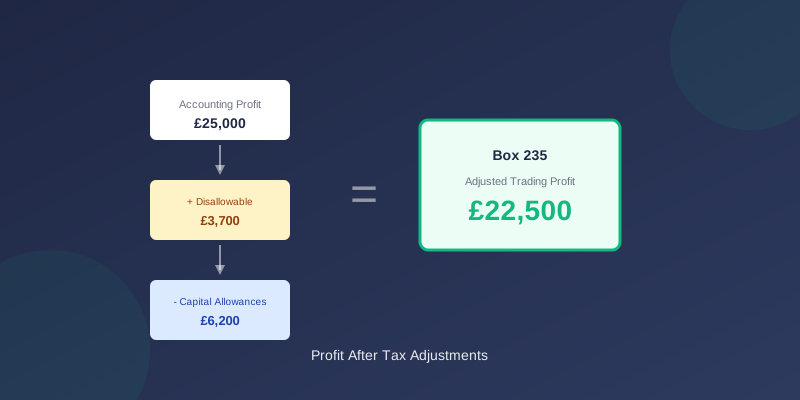
Step 4: Calculate Box 235
| Calculation | Amount |
|---|---|
| Accounting profit | £25,000 |
| Add: Disallowable expenses | £3,700 |
| Less: Capital allowances | (£6,200) |
| Box 235 | £22,500 |
Detailed Adjustment Examples
Depreciation vs Capital Allowances
In your accounts: Depreciation £3,000 on computer equipment
For tax:
- Add back depreciation: +£3,000
- Claim AIA instead: -£3,000 (if first year)
- Net effect: £0 (but shown separately)
Motor Vehicles
In your accounts: Car depreciation £2,400, running costs £1,800
For tax:
- Add back car depreciation: +£2,400
- Claim WDA at 18%: -£1,800 (example)
- Private use disallowance: +£360 (if 20% private)
Entertainment
In your accounts: Client entertainment £800
For tax:
- Add back 100%: +£800
- No deduction available
- Staff entertainment may be different
Legal Fees
In your accounts: Legal fees £2,000
For tax - depends on nature:
- Debt collection: Allowable (no adjustment)
- Property purchase: Capital (add back)
- Employment dispute: Usually allowable
Box 235 and Losses
If Box 235 Is Negative
A negative Box 235 means you have a trading loss:
- Enter the loss as a positive number in Box 235
- Tick the relevant boxes to indicate a loss
- Consider loss relief options (Box 275, 285)
Loss Relief Options
| Option | Box | Effect |
|---|---|---|
| Against current profits | Box 275 | Reduces tax this year |
| Carry forward | Box 285 | Against future profits |
| Carry back | Separate claim | Refund from prior year |
| Group relief | Additional forms | Share with group companies |
Related CT600 Boxes
Box 235 interacts with several other boxes:
| Box | Description | Relationship |
|---|---|---|
| 165 | Trading profits | Before adjustments |
| 170 | Trading losses | If loss-making |
| 315 | Capital allowances | Deducted to get 235 |
| 245 | Qualifying donations | Deducted after 235 |
| 250 | Losses brought forward | Deducted after 235 |
Common Mistakes
1. Forgetting to Add Back Depreciation
Wrong: Using accounts profit directly Right: Always add back depreciation, claim capital allowances
2. Including Non-Trading Items
Wrong: Including rental income in trading profit Right: Property income goes to Box 190, not Box 235
3. Incorrect Private Use Adjustment
Wrong: Full deduction for mixed-use assets Right: Restrict to business proportion only
4. Missing Capital Allowances
Wrong: Not claiming AIA on qualifying expenditure Right: Claim 100% AIA on most equipment (up to limit)
Using TinyTax
TinyTax calculates Box 235 automatically:
- Enter your P&L figures
- Answer questions about expenses
- We identify adjustments needed
- Capital allowances calculated
- Box 235 computed correctly
Verification Checklist
Before submitting, verify:
- Started with correct accounting profit
- All depreciation added back
- Entertainment costs added back
- Capital allowances calculated correctly
- Private use adjustments made
- Figure reconciles to computation
- Consistent with accounts
TinyTax automatically calculates Box 235 with all adjustments. Start your CT600 filing